No more spreadsheets for schedules, clickers for car parks and group chats for incidents. Moovent brings planning, accreditation, parking, field reports, live operations and post-event reporting into one system.
It works in any weather, at any hour, on any network.
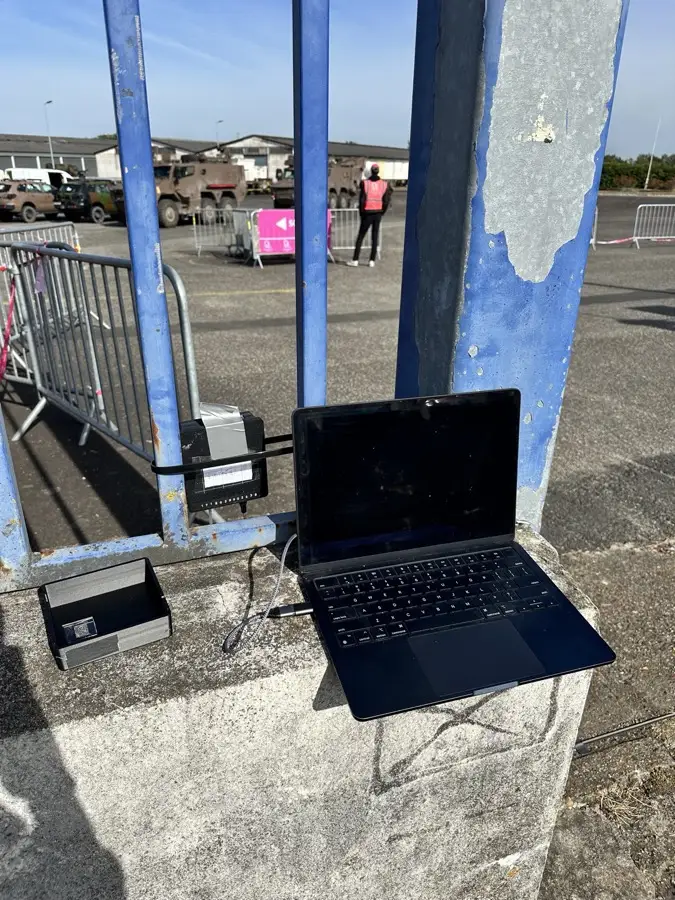
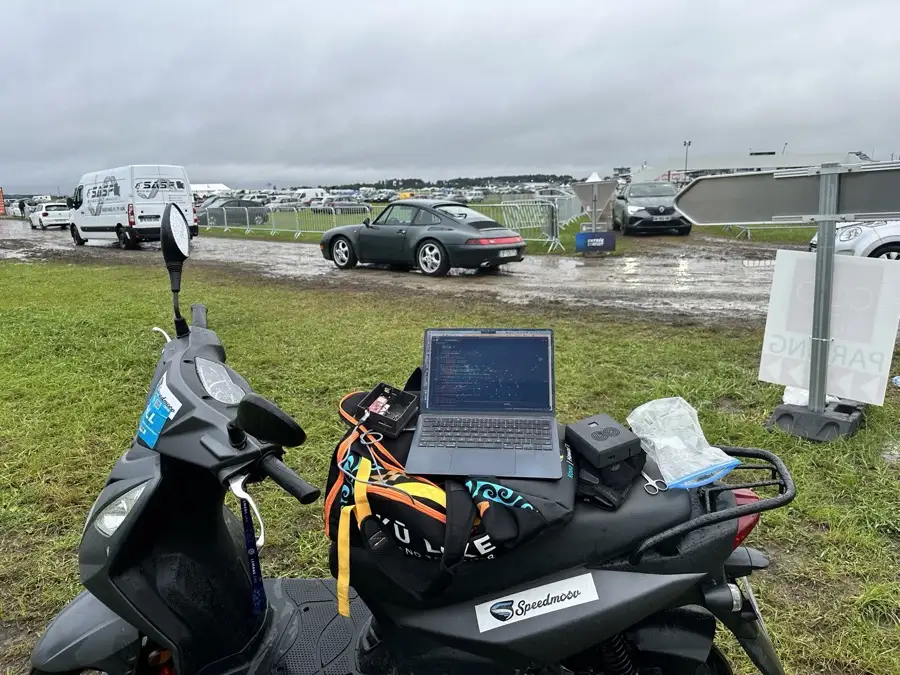
A week on one charge, every car in and out, on your map within minutes.
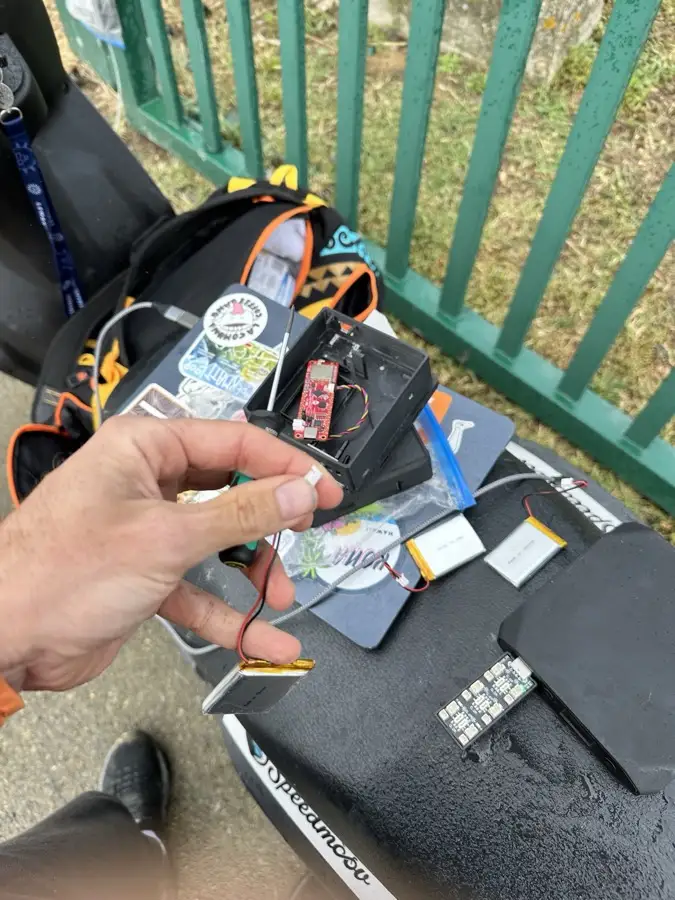
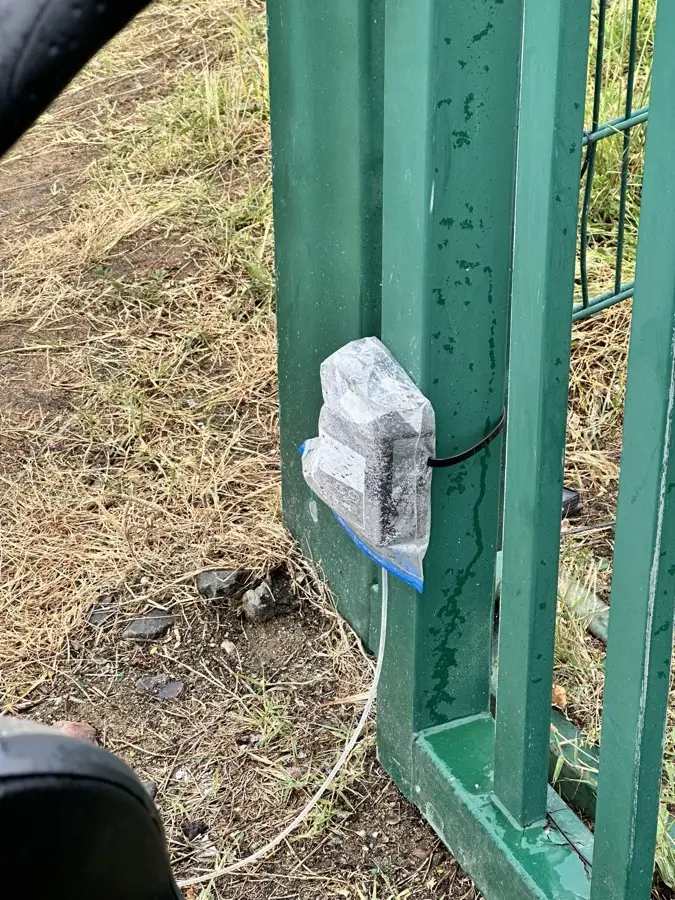
Plug and playAnyone can fix it down and connect the tubes, and it starts counting.Built toughMade to stay outside for the whole event, in dust and rain.Seven days on one chargeCharge it once, then forget it until the event is over.
4G, Wi-Fi, BluetoothWhatever the connectivity on site, your data keeps coming in real time.Real timeEvery car counted the moment it passes.Accurate on any surfaceTarmac, gravel, grass or dirt: every car counted, wherever you set it down.
Proven in the fieldEvent after event, on setups no road counter was built for.Best value on the marketThe most efficient counter, at the lowest cost.
Before the gates open: the schedule, the site and the people, set up from what you already have.
Your file, not ours
The momentMonday. The schedule arrives as the Excel file the team has used for ten years.
Every event team keeps its schedules differently, and none of them look like a database. Moovent reads yours as it is: the odd time formats, the legend on another tab. No template to fill in: it works out the columns and asks you to confirm. You upload what you already have, and it works.
In practiceExcel, CSV and KML files, up to 20 MB and 15 at a time. A time written 8h-16h, 08:00-16:00 or 0830-1645 is read the same way, and a legend kept on another sheet is read too. Moovent proposes how the columns map, you confirm it, and it remembers the mapping for the next file.
Nothing you can’t take back
The momentThe wrong file went in, three thousand rows of it.
Wrong file, wrong week. One click puts the last import back the way it was, even thousands of rows. Setting up an event stops being something you’re afraid to touch.
In practiceThe undo covers the last schedule or station import, tested at 50 000 rows. The previous state is saved in the same transaction as the import, so nothing is lost in between.
Set it up once
The momentJanuary. The next edition opens, same site, same gates.
Your stations, your zones, your badge types, your fields. Create next year’s event from this year’s and it starts already configured, instead of starting from an empty screen in January.
In practiceA new event can be created from a previous one: map and stations, car parks, people without their shifts, zones, accreditation types, badge designs and the approval route come over. Shifts never do, the roster is always this year’s. Your field setup is also kept as the company default for every new event.
Everyone gets their shift, without you chasing
The momentFriday, 6 am. The first agents are getting dressed and wondering where to go.
Each agent gets a link thirty minutes before they start. If the SMS doesn’t land, the email does. Change the roster the night before and the links still work. Nobody calls you at 6am asking where they’re supposed to be.
In practiceSwitch it on per event. Every five minutes Moovent looks at who starts within 30 minutes and sends the link by SMS; after three undelivered SMS it switches to email. The link is personal and permanent: change the shift, the phone or the station, and the same link still opens the right page.
Accreditations
Who may come in, where and when, from the partner’s request to the badge at the gate.
Partners do their own work
The momentForty partners, each with a list of names to send you, somehow.
You send each partner their portal. They register their own people, fill in the details, check them over. Last year’s crew comes back in two clicks. What used to be four hundred emails becomes a list waiting for your approval.
In practiceEach partner gets its own portal and may only register under the accreditation types you allow it. A partner admin can bring back the people it registered at your previous events, 200 at a time; they complete what is missing and go through the review again. Their rows then wait in your queue.
Eight thousand requests, one afternoon
The momentThe week before the event, the requests are all in and one person has to check them.
Nobody can check eight thousand accreditations one at a time, which is where most systems quietly fall apart. Moovent sorts the clean ones into one batch you approve in one action, and brings you one by one only those that genuinely need a person. What took a team a week takes one person an afternoon.
In practiceA request is clean when the identity is verified or not required, the type is assigned and allowed, the photo passes the AI check and the name matches nothing on the blacklist, exact or close. Clean requests are approved in batches of 200. A person approves every one of them; Moovent approves nobody on its own.
Nobody slips through
The momentA name on the blacklist comes back inside a partner’s list.
Nobody approves themselves. A blacklisted name always comes back to you. If everyone who was meant to approve has left, the file opens to the other reviewers instead of sitting there forgotten. The rules hold even when the people change.
In practiceAn approver can never decide on a request they submitted themselves. A blacklist match, exact or close, always lands in the one-by-one queue, ranked first, and the invitation is held until a reviewer decides. When every named approver of a step has left the company, the step opens to any reviewer with access to the event.
Identity checks that keep no document
The momentThe passport was checked. Now its scan sits on a hard drive.
Verify who someone is, then keep nothing you don’t need. The document goes as soon as the accreditation is approved. You get the certainty without inheriting a pile of ID scans you would now have to protect under the GDPR or the Swiss data protection act.
In practiceThe scan of the identity document is deleted the moment the accreditation is approved, and in any case after the event, or 30 days after upload when the event has no end date. What stays is a line saying the document was checked, and when. The badge photo stays until 30 days after the event, the record until it is anonymised.
Design your own badges
The momentThe sponsor changed its logo and the badges go to print tomorrow.
A badge design usually means a back-and-forth with an agency, a quote, and a week of waiting to move a logo. Moovent has the editor built in: front, back, your fields wherever you want them. Save the layout and next year’s badges take a minute. One less supplier, one less invoice, one less thing waiting on someone else.
In practiceThe editor lays out the front and the back: photo, name and fields, zone block, legal text, background. A design belongs to an event; copy it into next year’s event, or create next year’s event from this one and the designs come along. A test print and a print guide are there for your printer.
The right access, to the day
The momentA Thursday badge at the gate on Saturday.
Zones, dates, catering credits, which partner may register what. Set it once and every badge carries exactly the access it should, no more. An old badge can never open a new door.
In practiceA zone can be limited to days and hours of the week. A type has its own dates, by default the whole event. Catering and similar credits are counted per badge: unlimited, a total, or so many per day. At the gate a badge is checked for revocation, status and dates every time; a badge with a missing date is refused.
Rights, in layers
The momentMedical gets the paddock from Saturday only, and one doctor also needs the pit lane.
A zone is a door or an area. An accreditation type is a set of zones with its own dates and colour: Press, Medical, Security night. An access profile is the list of types a partner may register under. On top, one person can get one more zone without touching anything else. Stack them however your event works. Change a type, and everyone under it changes with it.
In practiceZones are one list per event. A type carries its zones, its colour and its dates. An access profile is a list of types; a partner gets a profile, plus or minus a type. One person can be granted or denied one zone on top. Change a type and every badge under it is recomputed, with a preview before you save; printed badges keep their print until they are regenerated.
The driver changed this morning
The moment8 am. The team’s driver is not the person on the badge.
It always happens. From one screen, the old badge is revoked, the new one is issued, and the gates know within the minute.
In practiceReplace is one action: the old badge is revoked and a new one issued together, or neither. Online scans check the revocation list live. Moovent phone scanners refresh their list every 60 seconds while open. Skidata barriers receive the revocation as soon as it is pushed.
Badges however they want them
The momentThe printer wants a PDF, the press want it on their phone.
Print-ready for your printer, or straight to Apple or Google Wallet. Most events need both, so you do both.
In practicePrinting: one PDF of A4 sheets, backs mirrored for double-sided printing, filtered by type, partner or ready state; above 300 badges it runs in the background. Wallet: Apple Wallet and Google Wallet passes, switched on per event and per accreditation type.
Run the day
What the control room sees and does while the event is on.
One screen, the whole site
The momentThree calls at once: a car park, a gate, a badge.
A full parking, a counter that went quiet, a badge that won’t scan. It all lands in the same feed, on the same map, and you act on it there. No switching between four tools to understand one situation.
In practiceThe live feed has four sources next to the event map: field reports, Pulse devices, TomTom traffic and car park capacity, with milestones at 60, 70, 80 and 90 %. Stations with nobody on post and the gates’ refusals have their own boards beside it.
Your screen, your job
The momentHospitality does not care about car park B.
A manager and a head of hospitality don’t need to see the same thing. Build a workspace from the cards you actually use. A company default greets everyone who has not built their own; anyone can build their own on top. Nobody scrolls past six things that aren’t their problem to find the one that is.
In practiceThe wall is a grid of eight cards per page, up to ten pages, cycling every 10 to 60 seconds. Twenty-seven cards to pick from: occupancy, car park board, time to full, staffing, Pulse health, traffic, incidents, battery, entries against exits and more. Your layout is saved with your account.
Every agent becomes your eyes
The momentAn agent at gate 4 sees a fence down, and has nobody to tell.
Your people already see the problems. They just have no way to tell you. A link on their phone, no app to install, and seconds later the control room knows. Reports arrive ranked, so the serious ones don’t sit behind the trivial ones.
In practiceThe report page opens from the SMS link, in the browser, with the eleven report types. Each type sets a floor: medical, fire and crowd are critical; accidents, fights, thefts and badge problems are warnings. An AI model reads the note and can only raise the level, never lower it, within 8 seconds. The control room receives reports over a live stream, sorted by severity then time.
They know you heard them
The momentSaturday afternoon. The reports have stopped coming.
An agent who reports something and hears nothing back stops reporting. In Moovent they hear back within the minute when someone picks it up. That’s how you keep people telling you things all weekend, not just on Friday.
In practiceWhen a report goes from new to in progress, the reporter is told within 60 seconds: on the report page if it is still open on their phone, otherwise by SMS, with the time it was taken.
Know before it’s full
The momentThe main car park is at 85 % and cars keep arriving.
Watch each parking fill on the map and set your own thresholds. Send drivers elsewhere while there’s still somewhere to send them, instead of after twenty minutes of circling.
In practiceEach car park turns amber from the threshold you set, 80 % by default, and red when full. Up to six milestones per event, 60, 70, 80 and 90 % by default, each one a line in the feed. The wall suggests where to divert as soon as a car park passes 90 % and another is under 70 %.
The roads outside your gates
The momentThe car park is half empty and nobody gets to it.
Your parking is fine and the approach road is blocked. Live traffic from TomTom on the same map as everything else, so you see the jam forming rather than hearing about it from the drivers stuck in it.
In practiceTomTom traffic flow and incidents are drawn on the event map, refreshed every 5 minutes on screen, from data at most 15 minutes old.
Alerts people don’t mute
The momentForty notifications an hour, and the one that mattered went unread.
Set what’s urgent by source and severity, with quiet hours. Everything urgent means nothing urgent, and a muted control room is worse than no alerts at all.
In practiceEvery user sets a reaction per source and per severity: silent, a counter, a notification, a sound, or the report opening by itself. Report types and single devices can be muted. Quiet hours, 02:00 to 06:00 by default, bring everything down to the counter.
Go back and look
The moment16:40, and two teams tell two different stories.
Something happened at 16:40 and nobody agrees what. Scrub the map back and see what the control room saw: the reports, the occupancy and who was on shift, as they were at that minute.
In practiceThe rail goes back over the whole event, or the last 24, 12 or 6 hours. Reports are shown with the severity they had at that minute, car parks from their recorded occupancy, agents from the roster of that hour. Live positions are not kept, by design.
Review
What the event leaves behind: numbers you can read the next morning and defend the next year.
The morning meeting has its numbers
The momentDay two, 7 am, the briefing.
Day two begins the same way everywhere: what went wrong yesterday, what to expect today. Usually from memory, because nobody has time to build a report overnight. Moovent counts from the start of the event, so yesterday is already written when you walk in. Use it during the event, or wait for the end and read the full one.
In practiceOne report per event, read for the whole event, one day or any window. It stays live until 15 minutes after the window ends; after that it is final. A day-by-day table, and a chip per day.
The day felt fine. Was it?
The momentSunday night. Everyone says it went fine.
Everyone remembers the two bad moments and forgets the twenty small ones. The report has every problem raised, who took it, how long it stayed open, and where on the site it kept happening.
In practiceEvery report with its type, where it was raised, who took it and who closed it. Time to take and time to close, with the slowest tenth. The backlog over the day. Counts per station and per car park, with the top type at each.
Nobody is short all day
The momentGate 7 was empty for forty minutes and nobody wrote it down.
Being short doesn’t last all day. It lasts forty minutes at a small gate that nobody was watching, because one person didn’t come and nobody told you. Or an hour at the far car park, too far for anyone to notice. If you look at the whole day, you never see it. Hour by hour, every gap has a time, a place and a length.
In practiceStaffing is measured on each station’s own slots, on a 30-minute grid, against the number it needed. Every gap is listed with station, zone, start, end, length and people missing; the fifteen longest first.
Where the gaps cost you
The momentThe budget meeting asks whether you really need the extra people.
Missing people is one number. What it produced is another. See the problems raised at stations that were short at that moment, and the day’s reports drawn over the vehicles on site, hour by hour. That is the difference between a staffing report and a reason to staff differently.
In practiceEach report is matched to the staffing of its station at the minute it was raised: the share raised at a short station is one number in the report. The overview chart draws vehicles on site and reports on one hourly axis.
The whole site, not one car park at a time
The momentCar park C filled at 15:40 and nobody knows why.
Each car park has its own curve. Put them on top of each other and the site makes sense: which one takes the morning rush, which one empties first, why the third jumps at 15:40 because the two before it were full. And the roads outside are read on the same clock, in the next block, so when the approach was jammed you can tell whether the road blocked the car park or the car park blocked the road.
In practiceEvery car park with a capacity is drawn as a percentage of its own capacity on one chart, with the 90 % line. Road conditions and access roads have their own blocks on the event clock.
Share it with your team, or anyone
The momentThe city wants the numbers, the sponsor wants a look.
Your team reads it live, inside Moovent. Anyone else gets a link to a frozen copy: the day as it was, without the notes and the photos, for seven days.
In practiceA public link is a snapshot taken when you create it, read-only, with notes and photos stripped. It expires after 7 days and can be revoked earlier. Sharing is a manager’s action and needs an active subscription.
The Pulse
The traffic counter events actually need
It works in any weather, at any hour, on any network.
A week on one charge, every car in and out, on your map within minutes.
The momentA camera at the far car park, at night, in fog, with no power socket.
Everyone wants cameras and AI now. On a real site they struggle: night, fog, headlights, rain, and a mains supply you have to find. A tube counts a car because a car drove over it. Nothing to see, nothing to light, nothing to plug in. We didn’t reinvent it, we made it small, rugged and live.
In practiceTwo rubber tubes across the lane, a pressure sensor on each. The order in which they are pressed gives the direction. Nothing to see, so nothing to light; nothing to plug in, it runs on its battery and charges by USB-C.
The same count at 3am in the rain
The moment3 am, rain, a queue crawling over the tube.
Most counters publish one accuracy figure, measured on a good day. The Pulse doesn’t change: tarmac, gravel, grass or dirt, dark or daylight, rain or dust. A car crawling in a queue is still counted. The number that matters is the one that holds all weekend.
In practiceA pulse shorter than 100 ms is ignored, both tubes pressed within 50 ms is wind or a shake, and after a vehicle the next two and a half seconds absorb rear axles and trailers. The counter is built to under-count rather than over-count: a car that stays on the tube for more than five seconds is deliberately not counted.
Tested where it’s worst
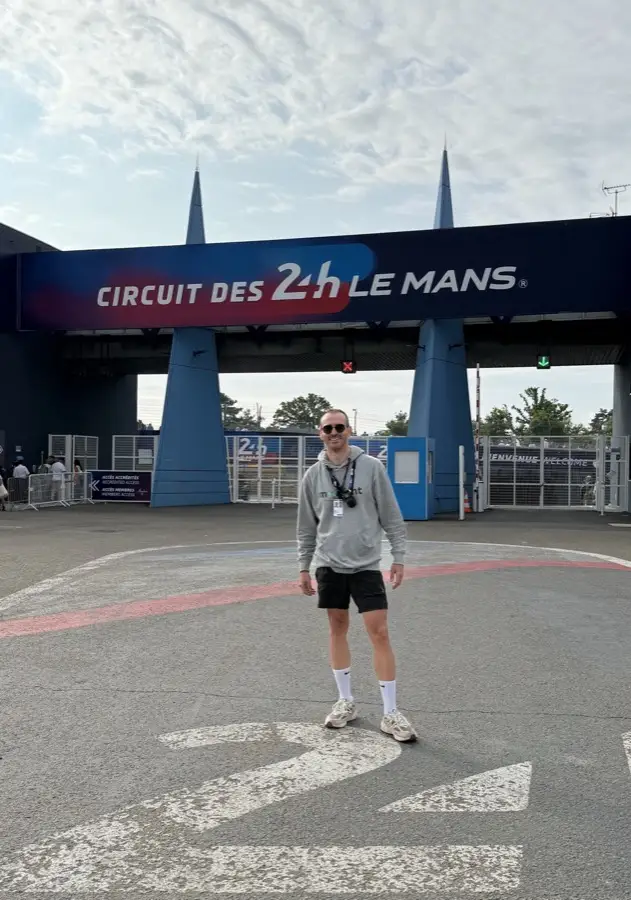
The momentLe Mans, June. 24 hours of cars, mud and heat.
The 24 Hours of Le Mans, every car park, in rain, mud, heat and cold, day and night, for a full 24 hours. What breaks there is what we fix first.
In practiceThe counters ran on the car parks of the 24 Hours of Le Mans in June 2026. The faults seen there, a sensor bus that froze until a power cycle and under-counts, are what the firmware’s self-recovery now targets.
No engineer, no technician
The momentThe counter arrives on Thursday and the technician on Monday.
One unit, around a kilo, fits in one hand. Put it on the ground, fix it, lock it, connect the tubes. Five minutes and it’s counting. Anyone on your team with the phone app can do it, and nobody has to come on site to help.
In practiceSetup is done from the Moovent phone app, iPhone or Android: sign in, find the counter over Bluetooth by its short ID, pair it during its pairing window, give it a name, add a Wi-Fi network if the site has one. On 4G it needs nothing else. The device is created in the dashboard first, from the QR code on its case.
Control it from anywhere
The momentThe counter is at the wrong entrance, two kilometres from your desk.
Rename it, move it to another car park, set its direction, pause it. From the web app in the control room; the phone app sets it up and names it, standing next to it. A change reaches the device within seconds when it is online, and the dashboard tells you until it is confirmed.
In practiceName, car park, direction (in and out, entry only, exit only) and active state are set in the dashboard. The settings go to the device over an encrypted link; the device acknowledges, and a reconciler re-sends anything that drifted. A device that is offline gets them when it reconnects.
It sorts itself out
The momentSomething went quiet at 2 am.
When something goes wrong it doesn’t wait for you to notice. It runs its own checks and fixes what it can. If it can’t, it says so on your dashboard, with what it is. Most of the time you’ll never hear about the problem you didn’t have.
In practiceA watchdog restarts it if it hangs for 4 minutes. If the network link stalls it resubscribes after 2 minutes, reconnects after 4 and resets the modem at the third attempt. The sensor bus is restarted with a growing back-off. It reports a tube that is loose, weak or waterlogged, and a sensor out of range. The dashboard flags each of these.
Seven days on one charge
The momentFive car parks, no sockets, a four-day event.
Charge it once and forget it until the event is over. You see the battery live on your dashboard, and it is flagged before it needs anything.
In practiceThe battery level comes with every batch and every 30-second heartbeat. Under 20 % the dashboard flags the device, a line enters the feed and the wall says to swap batteries at the next shift change.
4G, Wi-Fi, Bluetooth, SIM included
The momentNo signal in that corner of the field.
Whatever the site has, your counts arrive every few minutes. No signal in that corner of the field? It keeps counting and sends what it holds the moment it’s back. The SIM and the data are in the price. We never charge for data.
In practice4G on the built-in SIM, Wi-Fi when the site has it, Bluetooth for setup. Counts are sent in batches, every 5 minutes by default, sooner when 120 are waiting. Offline, the device keeps the last 128 vehicles in memory; a longer outage loses the older ones.
In and out, or one direction
The momentYou need to know how many are still inside, not how many came.
It counts both ways by default, so you get occupancy and not just arrivals. Lock it to entry only or exit only when that’s what you need.
In practiceThe order in which the two tubes are pressed gives the direction. Entry only or exit only is a filter applied as the counts arrive, set from the dashboard; the device goes on counting both ways, so you can switch back without losing anything.
Built to be dropped in mud
The momentSunday morning. The counter is under ten centimetres of mud.
It lives outdoors for the whole event, in dust and rain.
In practiceA gasketed case closed with four screws, the tube ports on the outside. It stays on the ground for the whole event.
A counter that costs what it should
The momentOne counter for the main entrance, because the second one costs too much.
A device like this usually starts around two thousand euros. There’s no reason for that. The Pulse is a fraction of it, which is the difference between counting your main entrance and counting every car park you have.
In practiceOn the price list the Pulse comes with the Enterprise plan, in early access, with our team on site. Small and Medium plans get it next.
In beta now
The momentYou want to try it this season.
We’re working with a small number of partner events this season, on very good terms. Get in touch and we’ll talk.
In practiceThe beta runs on Enterprise events with our team on site. Preorder opens the request on this page; we come back to you with dates and terms.
Technology
How Moovent fits next to the systems you already run.
It fits what you already run
The momentYou already have barriers, an access system and a spreadsheet.
Your Moovent badges open Skidata barriers, and every passage comes back. Registrants come in by API; your staff roster by secure file transfer. You don’t replace the systems that already work.
In practiceMoovent pushes each badge’s permissions to Skidata and withdraws them when a badge is revoked; the barrier decides on what it was given. Passages are read back from Skidata and logged against the badge. The API creates and lists registrants and returns statistics, with keys scoped read or admin. On the Enterprise plan an SFTP folder refreshes the staff roster from your HR system.
Built for the data you’re responsible for
The momentA year later, a former agent asks what you still hold about them.
Photos delete themselves thirty days after the event. Records anonymise twelve months after it. Delete a person and their badge stops at the gate, their file is anonymised and their passes are destroyed. The clock runs by itself, as long as your event has an end date.
In practiceBadge and report photos: event end plus 30 days. Identity documents: on approval. Records: event end plus 12 months. A deletion request is run by an operator with a typed confirmation: gate permissions withdrawn first, then badges, wallet passes and the file. Scan logs and the 30-day activity log are kept as described on the Security page.
OrganizeMooove
Events deserve better than chaos
One platform for the people at their stations, the Pulse devices on the road and the room that decides. Started by people who waited four hours to get into a Grand Prix.
Our vision
Events where nothing gets in the way of the event.
Our mission
Give event organisers one system for everything outside the show: the people on the ground, accreditation, parking, and traffic.
We came for the race. We remember the traffic.
French Grand Prix, Circuit Paul Ricard, 2018. Four hours in traffic just to get into the circuit. By the time we got in, the day was already ruined. We came for the race. We remember the traffic.
A few months later, we went looking for the tools organisers use to handle traffic and parking. There were systems for selling tickets, systems for badges, systems for barriers. Nothing that treated the whole thing as one problem.
In January 2024 we started Moovent with one goal: count the cars in each car park and tell the organiser before it fills up. Then organisers started asking. Where are my agents? Who’s accredited? What happened at 4pm yesterday? Each answer became another part of the platform.
We wanted to launch something complete rather than a test version, so we took our time. Moovent launched in October 2026.
We still answer fast, we still listen, and we’re still building. Because nobody should spend four hours getting into an event they paid to see.
When Moovent was still an idea: the first tests of an early prototype on the ground, Le Mans, 2024.
1,000,000+visitors welcomed
8,700+staff coordinated
50,000+parking spaces managed
It started with a problem we had ourselves
2018
June 2018
French Grand Prix at Paul Ricard. Four hours to get into the circuit.
2024
January 2024
Moovent is founded, to count cars on car parks and tell organisers when they fill up.
June 2024
First version of the Pulse device.
Autumn 2024
First version of the platform, with the live map and the live dashboard.
2025
January 2025
First Pulse devices on the road at French events.
September 2025
Pulse device V2 goes into beta.
October 2025
One million visitors counted.
2026
August 2026
Work starts on the accreditation and badge system.
October 2026
Official launch.
2027
Spring 2027
The Pulse is released.
Our core values
Impact over hype
A feature earns its place only if it saves a real decision on event day. If it doesn’t, we cut it.
The ground truth over the demo
We build for the person at the gate in the rain, not for the screen in a meeting room. When they disagree with us, they’re right.
Every event teaches us something
We’re there when events run, we see what breaks, and it’s fixed before the next one.
MooovePlan
Let's talk about your event day
Tell us what you run, when it happens and what you want to fix. We answer within one working day.
Get a quote for your event: plan, extra events, credentials and Pulse devices priced on your numbers.
See a demo on your own site plan, with your car parks and stations on the map.
Check that your badge readers and gates work with Moovent before you commit.
Run a beta Pulse device at your next event, supervised by our team.
Privacy policy
Last updated 20 November 2026
Version française à venir. La version anglaise fait foi.
About privacy
Moovent respects your privacy. This Privacy Policy explains what data we collect, how we use it, and the choices you have when you interact with our website and services.
We are committed to being transparent about what data we collect, why we collect it, and how you can control it. This policy applies to all visitors and users of the Moovent website and platform. By using our services, you acknowledge the practices described in this policy.
What information we collect
We may collect:
Information you provide
Your name, work email, phone number, company, and any message you submit via forms.
Any information you provide when you contact support or request product updates.
Information collected automatically
Basic website usage data such as pages visited, device and browser type, approximate location based on IP address, and performance data.
Cookies and similar technologies used for site functionality and analytics.
Service and operational data
If you use Moovent through an organisation, Moovent may process operational data such as site configuration, zone settings, occupancy counts, timestamps, and technical logs. This data is typically aggregated at zone level.
The Moovent mobile app
The Moovent app for iPhone is used by members of an organisation to set up Pulse devices, read accreditation badges and follow an event live. When you use it, we process:
Account data: your name, work email and a user identifier, used to sign you in and to show the events, Pulse devices and badges of your organisation. This data is linked to your account.
Precise location: when you start a live session, the app sends your position to Moovent so that the other members of your organisation can see you on the event map. Sharing runs only for the duration you choose and stops when you press Stop or when that time is up. You can refuse or withdraw the location permission at any time in the iOS Settings; the rest of the app keeps working.
Badge checks: the camera reads the badge held in front of it, and the app records which badge was admitted or refused, at which gate and at what time. This record belongs to the organisation running the event and is processed on its behalf. The camera image itself is not stored and not sent.
Pulse device setup: the app uses Bluetooth to configure a Pulse device next to you, including the Wi-Fi network you enter for it. No personal data is involved beyond the identifiers of the Pulse device.
Crash reports: if the app crashes, a technical report (device model, iOS version, app version, the error) is sent to our error monitoring provider so that we can fix it. These reports contain no name, email or location and are not linked to you.
Notifications: with your permission, the app shows notifications about your Pulse devices and events. You can turn them off in the iOS Settings.
The app does not use your data for advertising and does not track you across apps or websites of other companies.
How we use information
We use information to:
Respond to inquiries and communicate with you.
Provide and improve the website and Services.
Monitor performance and maintain security.
Send product and launch updates if you request them. You can unsubscribe at any time.
Sharing of information
We may share information with trusted service providers who help us run the website and Services (such as hosting, analytics, and email tools). We do not sell personal data.
We may also disclose information if required by law or to protect the security and integrity of our Services.
Data retention
We keep personal data only as long as needed for the purposes described above, unless a longer retention period is required by law.
Security
We use reasonable technical and organisational measures designed to protect your data. No system is 100 percent secure.
Your rights
Depending on your location, you may have rights to access, correct, or delete your personal data, and to object to certain processing. To make a request, contact us using the details below.
Cookies
We use cookies to keep the site working and to understand how it is used. You can control cookies through your browser settings.
Website analytics
With your consent, this website uses Google Analytics, provided by Google Ireland Limited, to count visits and see which pages are read. Nothing is loaded before you accept, and you can change your choice at any time under Cookie settings at the bottom of every page. Google may process this data outside Switzerland and the European Union, under the European Commission’s standard contractual clauses.
Website chat
The chat on this website is provided by Alta (altahq.com). Alta processes the messages you write and, if you give them, your name, email and company, so that we can answer you. These messages may be stored on servers in the United States. The chat only starts after you answer the cookie banner. It is an AI assistant: write to hello@moovent.io if you would rather talk to a person.
Changes to this policy
We may update this Privacy Policy from time to time. We will update the last updated date at the top of this page.
Address: Chemin du Crêt-Ministre 100 1090 Lutry Switzerland
Terms & conditions
Last updated 20 August 2025
Version française à venir. La version anglaise fait foi.
Acceptance of terms
By accessing or using the Moovent website or any Moovent products and services (the Services), you agree to these Terms & Conditions. If you do not agree, do not use the Services.
If you are using Moovent on behalf of an organisation, you confirm you have authority to accept these terms for that organisation.
Use of the website
You agree not to misuse the website or Services. This includes attempting to gain unauthorised access, disrupting performance, introducing malicious code, or using the site in a way that violates applicable laws.
Limited availability
Moovent may be made available in a limited test phase before public release. During this period, features may change, be added, removed, or temporarily unavailable. Any timelines shared are indicative only.
Intellectual property
All content, branding, designs, text, and visuals on the Moovent website, as well as the Moovent platform, are owned by Moovent or its licensors and are protected by intellectual property laws. You may not copy, reproduce, distribute, or create derivative works without prior written permission.
Links to third parties
The website may contain links to third party sites or services. Moovent is not responsible for third party content, policies, or practices.
Disclaimers
The website and Services are provided on an as is and as available basis. Moovent does not guarantee uninterrupted access, error free performance, or that specific operational outcomes will be achieved.
Limitation of liability
To the maximum extent permitted by law, Moovent will not be liable for indirect, incidental, special, consequential, or punitive damages, or any loss of profits, revenue, data, or goodwill resulting from your use of the website or Services.
Changes to these terms
We may update these Terms from time to time. We will update the last updated date at the top of this page. Continued use of the website after changes means you accept the updated Terms.
Address: Chemin du Crêt-Ministre 100 1090 Lutry Switzerland
Governing law
These Terms are governed by the laws of Switzerland. Any disputes will be submitted to the competent courts of Switzerland, unless mandatory law provides otherwise.
Moovent Mobility Sàrl is based in Lutry, Switzerland. Your data falls under the Swiss Data Protection Act and the GDPR, wherever your event takes place. Everything on this page describes what the product does today, nothing that is planned.
On the way between you and Moovent
What it protectsSomeone on the same Wi-Fi reading what your team sends.
A badge scanned at a gate, a report sent from a phone, a count leaving a Pulse device: all of it travels scrambled, so anyone listening on the network sees noise. The phone app and the Pulse devices also check that they are talking to the real Moovent server and refuse any other.
The ruleEncrypted transport, with the server certificate pinned in the app and in the Pulse devices
Identity details in storage
What it protectsA copied database giving away dates of birth and document numbers.
Dates of birth, document numbers and identity documents can be stored scrambled with a key that exists for your organisation only. Without that key, the stored data is unreadable. Moovent creates the key and keeps it locked under a master key that lives outside the code. Encryption is switched on per organisation.
The ruleAES-256, one key per organisation
Passwords and codes
What it protectsA leak that hands out passwords.
Moovent never stores a password, a partner code or an API key as it is. It keeps a one-way version that cannot be turned back into the original, so not even Moovent can read them.
The rulebcrypt one-way hashing
Keys and secrets
What it protectsA key left in the code and found by the wrong person.
Encryption keys and signing keys live in a vault hosted in Europe, outside the code and outside the server. If a key is missing, the server refuses to start rather than run without it.
The ruleSecrets vault, hosted in the EU
Records nobody can alter quietly
What it protectsA deleted approval, a changed timestamp, a badge that was never on the record.
Five registers (actions, accreditation actions, consents, erasures, photo erasures) are chained: every entry carries the fingerprint of the one before it. Every night at 03:00 the whole chain is recomputed. If one record was changed or removed, the chain breaks and an alert goes out.
The ruleSHA-256 hash chain, verified nightly
Gate systems
What it protectsA forged message telling a gate to let someone through.
When a gate system such as SKIDATA talks to Moovent, each message carries a signature made with a secret only the two systems share. A message without the right signature is refused.
The ruleHMAC-SHA256 signed messages
GDPR, in practice
You are responsible for the data of your event. Moovent processes it for you. Here is what the product does for each duty the law puts on you, so you can answer an attendee, a partner or a lawyer without calling us.
Consent
What it protectsProving that a person agreed, and when.
Every consent and every withdrawal is written down with the version of the policy they saw, the time and a scrambled address. The register is chained like the others and kept for three years.
The ruleGDPR article 7
Image rights
What it protectsA photo of a person used without their say.
The waiver people sign tells them the event is filmed. If you need individual portrait consent, you switch on a box and each answer is stored with its version, time and channel. The proof is kept five years after the person is anonymised.
The ruleWaiver, portrait consent per organiser
Access and export
What it protectsA person asking what you hold on them.
Any user can export their own data from their account. An administrator can export everything held on one person: as a user, as an agent, as a registrant. Passwords are never part of it.
The ruleGDPR article 15
Erasure
What it protectsA person asking to be forgotten.
A user can ask for deletion from their account. It runs after 30 days and can be cancelled before. An administrator can erase a person on request. Each erasure is written in a register that keeps the identifiers and the counts, not the person, so you can prove it happened. Deleting an event erases all its accreditation data in one go.
The ruleGDPR article 17
Anonymisation
What it protectsData kept long after the event, for no reason.
Registrants are anonymised twelve months after the event ends, automatically.
The ruleStorage limitation, GDPR article 5
How long things are kept
What it protectsA photo or an identity document sitting on a server for years.
Registrant photos: 30 days after the event. Identity documents: deleted the moment the accreditation is approved, or 30 days after upload. Field report notes and photos: 30 days after the event. Register of actions: one year. Register of consents: three years.
The ruleRetention periods per data type
Nothing on the badge
What it protectsA lost badge revealing who someone is.
The QR code on a badge is a random number. It carries no name, no zone and no date. Everything is looked up on the server at the moment of the scan.
The ruleData minimisation, GDPR article 5
Where the data is
What it protectsNot knowing which country holds your data.
The application and the files are in Frankfurt, the database in Paris. A few services run outside Europe under standard contractual clauses: email delivery, SMS to agents, error reports without personal data, and the AI that checks badge photos and ranks the urgency of report text. The counts from Pulse devices, which hold no personal data, are processed in the United States.
The ruleEU hosting, standard contractual clauses for the rest
Your contract with us
What it protectsAn auditor asking for the paperwork.
A data processing agreement and the list of sub-processors are available on request. If a breach ever affects your data, you hear from us within 72 hours.
The ruleGDPR articles 28 and 33
AI assistants and MCP
Claude, ChatGPT or any MCP client can read your event through Moovent's MCP server. An assistant that can read your event is useful. An assistant that can read everything is a risk. Here is the line between the two.
Read only
What it protectsAn assistant changing or deleting something by mistake.
An assistant can read counts, reports, staffing and the overview of the event. It cannot create, change, delete or export anything, whatever it is asked.
The ruleRead-only scope
One person, one organisation
What it protectsA connection that sees more than the person behind it.
Each member connects with their own seat and their own rights. A connection belongs to one organisation and to the events you choose, and it has an end date.
The rulePer-person authorisation with an expiry
Connecting
What it protectsA connection made with a stolen password.
Connecting an assistant asks for your password and a two-step code. Widening an access asks for a fresh code.
The ruleOAuth 2.1 with PKCE, two-step verification
What is never shared
What it protectsNames and photos ending up in a chat.
People's names and contact details, free text, photos and exact positions never leave Moovent through an assistant.
The rulePersonal fields excluded by design
Disconnecting
What it protectsAn assistant that keeps access after a person leaves.
You can disconnect an assistant from your Moovent account at any time. An administrator can cut any connection, or pause an application for the whole organisation.
The ruleRevocation by the person and by the administrator
A log of what was read, on Enterprise
What it protectsNot knowing what an assistant looked at.
Enterprise keeps a log of what each assistant read: which tool, when, by whom and how much, never the content itself. The log is chained and signed like the other registers.
The ruleSigned audit log
Who sees what inside Moovent
A head of security and an intern on the welcome desk do not need the same screen. Access follows the person, the organisation and the event.
Four roles
What it protectsA member doing more than their job allows.
Viewer, Editor, Manager, Administrator. Each role unlocks the next set of actions. Moovent's own operators are separate from your administrators and cannot be confused with them.
The ruleRole ladder, operator separate
Event by event
What it protectsSomeone from one event looking into another.
A member sees every event of the organisation, or only the events listed on their account. Every request is checked against the organisation that owns the event, every time.
The rulePer-event access check on every request
Partners
What it protectsA partner's password written on a sticky note.
Partners have no password. They sign in with a six-digit code sent by email, valid ten minutes, five attempts.
The ruleOne-time code, 10 minutes
Sessions that end
What it protectsA screen left open in a shared office.
A dashboard session ends after 48 hours, or after 30 minutes without activity, a delay you can set between 5 minutes and 24 hours. A partner session ends after 4 hours.
The rule48 h session, 30 min idle timeout
Company sign-in
What it protectsAn account that survives someone leaving the company.
Enterprise accounts sign in through your company's own identity system, with a two-step code and recovery codes. When a person leaves the company, their Moovent access leaves with them.
The ruleSAML single sign-on with two-step verification
Limits on attempts
What it protectsA program trying thousands of passwords.
Sign-in attempts are limited to five per minute per address, and the rest of the API to 200 requests per minute.
The ruleRate limits
Badges and gates
A badge is only as safe as the check at the gate. Here is what happens in the second between the scan and the green light.
Checked at every scan
What it protectsA badge used after its dates, or after it was revoked.
At every scan the server checks three things: the revocation list, the status of the badge and its validity dates. If anything is missing or wrong, the gate refuses.
The ruleServer-side check, fails closed
Revoked at the next scan
What it protectsA badge still working after you took it away.
Revoke a badge and it is refused at every gate from the next scan, whether it is printed or in a phone wallet.
The ruleImmediate revocation
Phone wallets
What it protectsA badge screenshot passed around.
Badges go into Apple Wallet and Google Wallet. Each pass is signed with the platform's own certificates, so a wallet only shows a pass that really came from Moovent.
The ruleApple PassKit, Google Wallet
Scanning without network
What it protectsA gate that stops when the network drops.
The phone app keeps the badge list it needs in an encrypted store on the phone, so scanning goes on without signal. The store is cleared at sign-out.
The ruleEncrypted offline store
The phone app and the Pulse devices
Your agents carry the app in their pocket and the Pulse devices sit on the roadside all weekend. Both hold as little as possible.
On the phone
What it protectsA lost phone giving away an account or a photo's location.
Sign-in tokens live in the phone's keychain, on that phone only. Photos sent with a report are stripped of their camera and location data. Crash reports carry no name, no email and no location. There is no ad tracking.
The ruleKeychain storage, metadata stripped
Position
What it protectsAn agent tracked after their shift.
An agent's position is shared only while they are live, for the time they chose. It stops when the timer ends or when they tap Stop. No route history is stored.
The ruleTimed sharing, no history
Pulse devices
What it protectsA device on the roadside leaking something personal.
A Pulse device sends counts and its own status, nothing else. It talks to Moovent over an encrypted link and checks the server's certificate before sending.
The ruleEncrypted link, certificate pinned
Data processing agreement and list of sub-processors available on request.